The WhatsApp Ghosting Epidemic: Why Couples Stop Replying
Every wedding photographer knows the exact feeling: An inquiring couple reaches out on WhatsApp or Instagram with great excitement:
"Hi! We love your photography style! We are getting married on December 14th in Udaipur. Could you please share your wedding packages and rate card?"
You reply within minutes, attaching your beautifully designed 6-page PDF price sheet or typing a 300-word breakdown of your 2-day wedding coverage in ₹ Rupees.
And then... silence. Blue ticks appear, but no reply. Days turn into weeks. You follow up with a polite "Hi, did you get a chance to check our packages?" — only to be met with more blue ticks or a cold "We are still deciding, will let you know."
If this happens to more than 40% of your inquiries, you do not have a pricing problem or a portfolio problem. You have a Friction & Presentation Problem.
The Real Reasons Wedding Clients Ghost Your WhatsApp Inquiries
Before fixing your follow-up routine, you must understand what happens inside a couple's mind when planning a wedding:
1. Static PDFs Overwhelm Mobile Users
Planning a modern wedding is exhausting. Couples juggle venue managers, caterers, decorators, choreographers, and makeup artists. When you send a static PDF, you force them to pinch-to-zoom on a smartphone screen, cross-compare different package tiers in their head, and mentally calculate add-on costs. When a task requires mental friction, people postpone it — and postponed tasks get forgotten.
2. Lack of an Immediate Next Step
When you send just a price list without an interactive proposal or a specific question, the conversation reaches a dead end. The client is left thinking: "Okay, I saw the price. Now what?"
3. You Treat Every Inquiry as a Price Shopper
When you immediately dump numbers without asking two qualifying questions about their wedding vision, you commoditize your art. Couples choose photographers based on emotion, trust, and connection, not just a line item on a spreadsheet.
The 4-Step Anti-Ghosting WhatsApp Response Framework
Leading studios don't rely on luck. They use a structured 4-step communication framework that turns cold WhatsApp inquiries into booked dates:
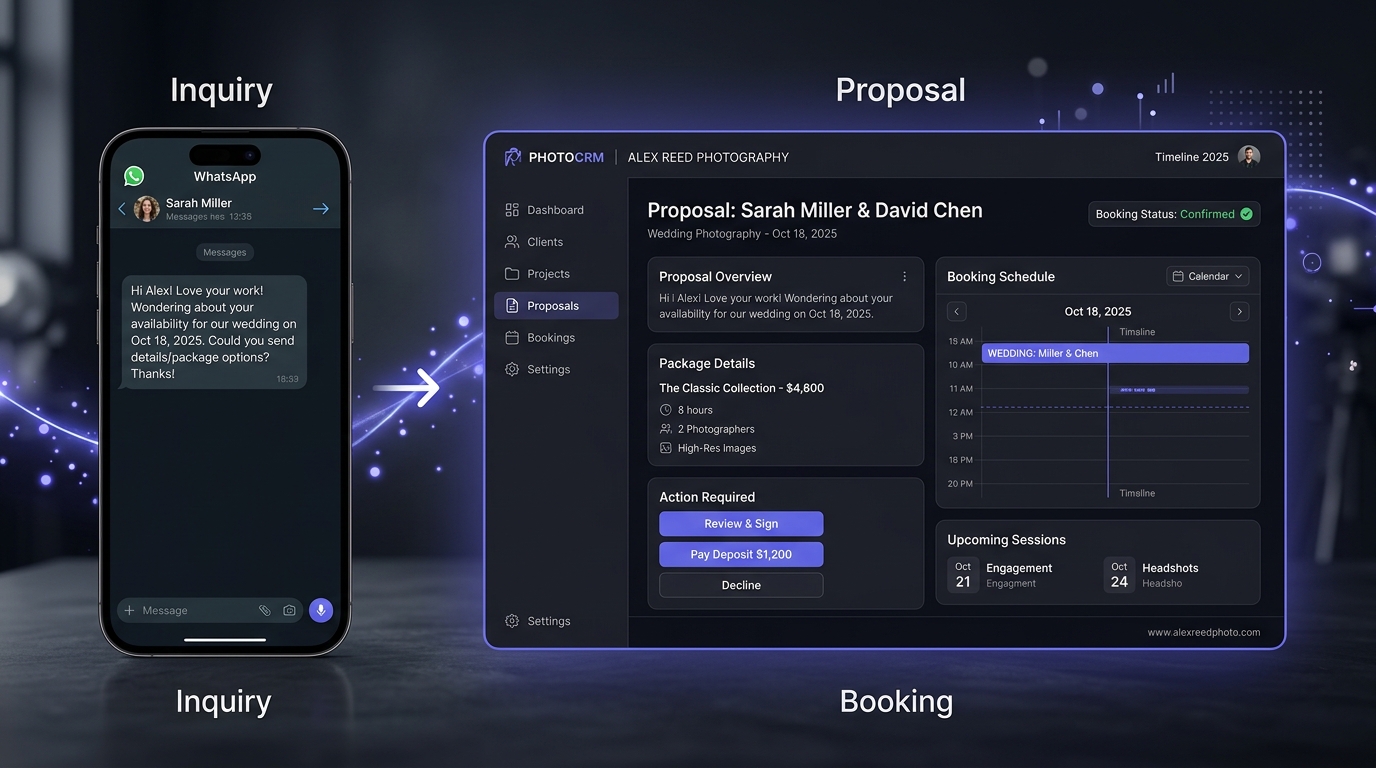
Figure 1: Transitioning from an unorganized WhatsApp chat into a structured PhotoCRM proposal with instant online package review and deposit payment.
Step 1: The "Immediate Warmth & Qualification" Rule (Within 15 Minutes)
Do not send your rate card on message #1. Instead, validate their inquiry, confirm date availability, and ask one engaging question:
Why this works: It breaks the "price shopper" dynamic, creates instant human dialogue, and invites a micro-commitment reply.
Step 2: Replace Static PDFs with an Interactive Smart Proposal
Once the client shares basic event details, send them a clean, mobile-optimized interactive proposal link rather than a static PDF. When clients can tap on their phone to select package tiers, toggle add-on services (such as drone coverage, instant reels, or luxury flush mount albums), and watch real-time ₹ Rupee totals calculate automatically, engagement skyrockets.
Step 3: The 3-Stage Value-Driven Follow-Up Cadence
Never send generic "Any update?" messages. Every follow-up message must provide genuine value:
- Follow-Up 1 (24 Hours Later): Helpful Resource
Share a short 30-second video reel or a link to a full wedding gallery shot at their exact venue or a similar setting. "Hi [Name], thought this might give you some photo inspiration for your Udaipur venue!" - Follow-Up 2 (48 Hours Later): Date Hold Urgency
Politely notify them that another client has inquired about the same weekend. "Hi [Name], just wanted to give you a quick courtesy heads-up — we received another inquiry for Dec 14th. Since you contacted us first, we'd love to hold the date for you until tomorrow evening if you're still considering us." - Follow-Up 3 (Day 5): The Professional "Breakup" Message
The breakup message is psychological magic. When you respectfully release pressure, clients often respond immediately. (See Template 4 below).
4 Copy-Paste WhatsApp Follow-Up Templates for Photographers
Copy and adapt these proven templates for your studio:
Template 1: Initial Response (Before Sending Price)
"Hello [Client Name]! First of all, huge congratulations on the wedding! 🥂 We love shooting in [City/Venue]. We do have availability for [Date]. So I can share the most relevant options with you, could you share if you're looking for Candid Photography only, or full Photography + Cinematic Film coverage?"
Template 2: Sending the Interactive Proposal
"Hi [Client Name]! Based on what you shared, I've put together an interactive proposal tailored for your wedding: [Proposal Link]. You can view our highlight film, customize package options, and check real-time pricing in ₹ INR directly on your phone. Take a look and let me know which collection feels closest to your vision!"
Template 3: 48-Hour Polite Follow-Up (Value + Date Hold)
"Hi [Client Name]! Hope your wedding prep is going smoothly. Quick heads-up: we recently had another consultation request for [Date]. Since we spoke first, we'd love to prioritize your dates. Would you have 10 minutes this evening for a quick phone call to answer any questions about the packages?"
Template 4: The 5-Day "Breakup" Message (Highest Response Rate)
"Hi [Client Name]! I know how chaotic wedding planning can get, so I completely understand you're super busy. I assume you may have chosen another direction or postponed dates, so I'll go ahead and release our calendar hold for [Date] to other couples. If you ever need photography advice or want to revisit packages in the future, our door is always open! Wishing you both a wonderful wedding! ✨"
How Dedicated Photography CRM Software Automates Your Lead Tracking
Following up manually with 20 or 30 WhatsApp inquiries every month is exhausting. Conversations get buried under personal family chats, sticky notes get lost, and dates slip away.
This is why high-earning wedding and portrait studios manage their inquiries using specialized photography CRM software like PhotoCRM. Instead of disorganized WhatsApp threads:
- Visual Lead Kanban Board: Every inquiry appears as a visual card on your pipeline (New Inquiry → Quote Sent → Follow-up Required → Contract Signed → Advance Paid). You can see at a glance who needs a follow-up today.
- Smart Online Proposals in ₹ Rupees: Generate branded interactive proposals in 60 seconds with itemized packages, add-ons, e-signatures, and instant UPI/QR advance payment links.
- Automated Follow-Up Reminders: PhotoCRM alerts you exactly when a client opens your quote and triggers scheduled follow-up reminders so no lead turns cold.
- Centralized Studio Calendar: Booked dates are instantly locked on your multi-shoot calendar, ensuring zero double-booking risk.
Your 15-Minute Daily Lead Routine for Maximum Bookings
To consistently hit 50+ high-budget wedding bookings per season, build this 15-minute daily habit:
- Morning (5 mins): Open your PhotoCRM Kanban board. Check the "Quote Sent" column for any proposals older than 24 hours.
- Send Value-Based Follow-ups (5 mins): Dispatch Template 2 or 3 to clients whose dates are still open.
- Clear Stale Leads (5 mins): Send Template 4 (Breakup message) to inquiries older than 5 days. Archive cold cards to keep your sales pipeline clean and focused.
Stop Losing Photography Leads to WhatsApp Silence
Streamline your lead pipeline, send interactive quotes that clients accept on their phones, and automate your studio booking workflow with PhotoCRM.